Showing posts with label Josh's Story. Show all posts

Thursday, December 20, 2018

Measuring Oracy with...Google Forms!

This year my school is really trying to work on oracy - encouraging students to participate orally through multiple turn-taking.  We as teachers are doing a lot to plan to get 100% of our students participating in discourse.  What we're doing to track our progress and monitor how students are participating is by measuring student participation.

Measuring student talk?  What?  If you haven't done this before, you're probably wondering what this looks like.  As an example, in a circle discussion, you might draw a circle on a piece of paper and label the circle with where students are sitting.  Then as the discussion occurs, you can note what is happening in the discussion: who participates, how they participate (add on, agree, disagree, etc.), and if students are participating in a non-verbal way such as hand signals.  It might look like this:
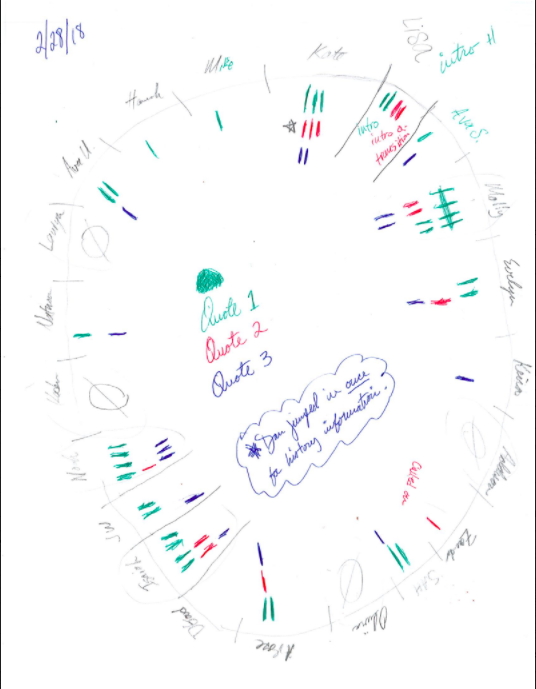


This is great.  You can easily see who participated a LOT and who did not participate at all.

This was presented to us at a PD opportunity, and I immediately thought: GOOGLE FORM!

I am terrible with paper, and every day the places where the kids sit changes.  With a Google Form, I could just list all of my students and possible ways that students could participate in a discussion.


This is AUGMENTATION!  How?

  • I can more easily track data
  • I can view trends
  • I can aggregate data more easily based on: subject and language of instruction!

Since I teach in a dual language classroom, I want to see who is participating more in English vs. Spanish.  I can also check to see who may feel more comfortable participating in literacy or numeracy, small group or whole group.

The best part?  I have told my students that I am tracking their participation using this form.  I show it to them.  They WANT to see how they participated.  I have students whose job is to run my discussions, and about halfway through our discussion time, I show them who has not participated yet and their job is to find a way to get those students involved.

I showed this to the staff at my school and we now have teachers in grades as low as Kindergarten using this to track the quantity and quality of their students' participation in oracy activities.

I have only used this so far in whole group discussions, but I am now starting to use it in small group discussions.  Some students just don't feel comfortable talking in front of a whole group!  But this is an awesome tool that you can try to use to check in and really see just how much your students' participation in discussions grows and changes over time.

Friday, March 17, 2017

I don't know what to do! What are we doing? There's an app for that!

How often do you see a student who is just kind of putzing around the room with seemingly no direction?  You ask them what they're doing and they say that they don't know what to do.  You just gave a GREAT mini-lesson, checked to make sure that they understood by having them repeat the steps and yet somehow between getting the assignment that they needed to do and their table they somehow forgot everything that you had just said.  That's not frustrating at all right?

There's an app for that!  A colleague of mine in fifth grade told me about how she uses Google Slides to give students their work for the day, links, etc. all in writing.  Well, 1st graders can't all read that well, so I decided that I was going to take her idea and modify it for first grade with pictures.  I literally call it our "What are we doing?" slides.  You can see what mine looks like here (it's all in Spanish).  When a kid is puttering around aimlessly or actually takes the initiative to ask me what we are supposed to be doing, I tell them to go right to our What are we doing slide for whatever time of day it is.  I change it every day as needed, but I still have a copy of my original slide show that I keep the original slides in so that I can always copy and paste the original slides back in to the current slide show at any time in case we have a strange week with a different schedule, etc.

I've put pictures of what they are supposed to do as much as I can to make it more universally-accessible.  To say that it has changed up how I do my day is an UNDERSTATEMENT.

What should we do in this center?  Boom! Check Google Slides.

What's our Seesaw login again?  Boom!  Check Google Slides.

The best part?  It lets me send kids links to work I want them to do really easily!  I have a Google Doc with a list of reading responses that I want them to do that they can pick from, and I just inserted the link into the Google Slide for my Responding to Reading slide.  I have students who were making bad decisions for their learning, so I have the link to a Google Form that I created that lets them reflect on their behavior and then I email their responses to their parents so that they can talk about it at home.  And I'm just scratching the surface!

What are some ways that you use Google Slides in your class?

Friday, February 3, 2017

Delayed Launch...Instant Reward!

Where I left off last, I had made my first so-so attempt of a math unit on Blackboard, but I missed one crucial step: enrolling my students in the course.  In my defense, I only took the Blackboard 101 TDP course, and Wendy told me that enrolling students in a class was covered in the 102 class.  Anyways, Wendy helped me enroll my students in the class, and the next day I got the students going in Blackboard!

It was so awesome!  They were watching the videos I found IN SPANISH from Youtube (Dual Language teachers know that that is no small feat), and they were even starting to explore some of the activities.  

Was it perfect?  No, but the kids didn't mind.

Did everything work?  No, the kids couldn't figure out how to get 2 files to open (nor could I) and one activity didn't work because it required Flash.

Was my entire math unit all on Blackboard?  Definitely no, but it was a definitely a good start for using Blackboard as the Can Do part of my math as I am now using Must Do/Can Do.

Were the kids learning?  YES!  They were learning all about telling time and hearing it from a native Spanish speaker, which despite my fluency, is something that is HIGHLY important.

The best part about it?  The kids were all working independently, or in the case of my overly social group, interdependently.  I got to meet with 3 guided groups that day, and I even had time to show an advanced group a hack that involved app smashing to differentiate an activity to challenge themselves more.  (*I received no compensation from the ONE Conference Keynote Speaker for that reference)

It felt so great!  I went right back to work that night to try to fix some of the things that didn't work and tried to figure out more ways to build in more activities on Blackboard.

Thursday, December 8, 2016

Failure to Launch...Blackboard

The Beginning

Last spring I took the Blackboard 101 TDP course, and most of the time I was thinking a combination
of 3 things:
1. How can first graders use this?
2. How can dual language students use this?
3. How the heck can I use this?

My head was swimming in a sea of content files, items, learning modules, and a vast array of other tech speak I was still not even near fluent in.  I suppose that's why it was a 101 course.

I made it through, and I made a unit about telling time.  It was really clunky, and I'm still not quite sure if it would've worked or not because I never let my kids use it.

This year, though, I was determined to give it a try.  Now that I'm in my fourth year of teaching I'm kind of ignoring Todd's constant "Be the tortoise" and thinking more along the lines of "Work smarter, not harder."  I wanted to build a Blackboard course little by little so that I could get things figured out and all uploaded to my Blackboard course so that NEXT year I'll have almost everything I want to teach all laid out for me already.  No more searching through my Google Drive to find that one worksheet on graphing that the kids somehow thought was interesting or poring over file folders and stacks of papers to find that one great worksheet in English that a colleague gave me that I colored over with White Out and wrote the Spanish translation on top of.

No.  Last year when we had to make all of those Language Workshop planners I was kind of begrudgingly doing them.  This year, though, my language workshop is all planned out for me already!  If I do the hard work THIS year, I won't have to do it next year and hopefully for years to come until we get another big change like Common Core again.

Well, I got my course built with a little help from Wendy Liska and my knowledge from Blackboard 101, and launch day came.  I had the kids all sit down and I talked them through logging onto the new Blackboard App.  Miraculously we got through it in only 15 minutes!  I was feeling great!  They'd have so much time to explore and use my new unit!  But...I missed one crucial step.

I failed to enroll my students in my class.  I ended up getting the kids on one of the apps that they would've used as part of the Blackboard unit, and I scrubbed the rest of the day's math plans for another day.

Stay tuned for my follow-up to this about what happened when I actually did launch Blackboard and how things went.